
Why Does Vinyl Crackle? How to Diagnose Pops, Clicks and Surface Noise
The character of the noise tells you what's causing it — and whether you can fix it. A diagnostic guide to every type of vinyl surface noise.
Not All Crackle Is the Same
The internet's standard answer to "why does my vinyl crackle?" is usually some variation of: clean your records and buy an anti-static brush. That advice is not wrong — but it is incomplete. It assumes every crackle has the same cause and the same solution.
It doesn't.
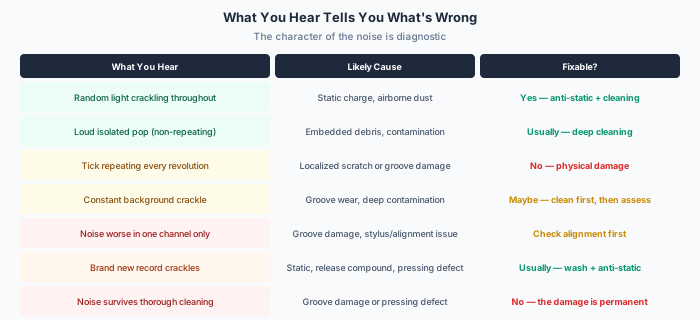
Vinyl surface noise has multiple distinct causes, and the character of the noise itself is diagnostic. A random light crackle tells you something different from a loud repeating tick. A background hiss means something different from an isolated pop. Learning to listen to the noise — rather than just being annoyed by it — is the first step toward eliminating it or understanding why it cannot be eliminated.
The Six Causes of Vinyl Surface Noise
1. Dust and Airborne Particles
The most common and most easily resolved cause. Airborne dust settles on the record surface between plays — or is attracted by static charge — and the stylus encounters these particles as it tracks the groove. Each particle generates a click or pop as the stylus rides over it or pushes it aside.
What it sounds like: Random light crackling distributed across the playing surface. No pattern. No repeating tick. Varies between plays.
The fix: A carbon fiber brush before each play removes loose surface dust. This is the single most effective daily maintenance step. It costs $15–$25 and eliminates the majority of casual surface noise.
2. Static Charge
Vinyl is an excellent insulator, meaning it accumulates static charge readily — especially in dry environments or when removed from inner sleeves. Static attracts dust particles to the record surface and can also generate audible crackle independently as the stylus discharges accumulated electricity.
What it sounds like: Pervasive light crackling that may be worse on one side. Often accompanied by visible dust attraction — you can see particles jumping to the record surface.
The fix: An anti-static gun (Milty Zerostat or equivalent) neutralizes the charge. Maintaining room humidity above 40% reduces static buildup. Anti-static inner sleeves (MOFI or similar poly-lined) prevent charge accumulation during storage.
3. Embedded Contamination
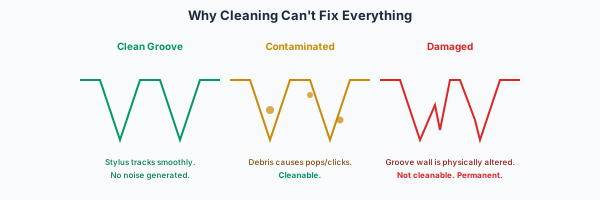
Deeper than surface dust. Fingerprint oils, atmospheric pollutants, mold release compound from manufacturing, cleaning-fluid residue, and microscopic debris can become lodged in the groove walls. A dry brush cannot remove material that has bonded to the vinyl surface.
What it sounds like: Louder pops and clicks that persist after dry brushing. May include a general "dirty" quality to the sound — slightly veiled or congested compared to the same record when truly clean.
The fix: Wet cleaning. A proper record-cleaning machine (vacuum or ultrasonic) is the gold standard. Manual wet cleaning with appropriate fluid and microfiber cloths is the budget alternative. The objective is to dissolve and remove contaminants that have bonded to the groove walls.
4. Cleaning-Fluid Residue
An overlooked cause. Some cleaning fluids leave a residue when they dry — particularly alcohol-based solutions or products not designed specifically for vinyl. This residue sits in the groove and generates its own noise, ironically making the record sound worse after "cleaning" than before.
What it sounds like: A record that crackles more after cleaning than it did before. Often described as a "crunchy" or "gritty" quality rather than sharp clicks.
The fix: Rinse with distilled water after any fluid-based cleaning step. Allow the record to air dry completely — or use a vacuum cleaning machine that removes all fluid from the groove. Never use tap water (mineral deposits create new noise).
5. Micro-Scratches and Light Groove Damage
The boundary between fixable and permanent. Light scratches — often invisible to the naked eye — create consistent noise because the stylus physically encounters the damaged groove wall on every play. These cannot be dissolved or washed away because the damage is to the vinyl itself, not something sitting on top of it.
What it sounds like: A consistent tick or pop that repeats at the same point every revolution. If you can identify "it always clicks right before the chorus" — that is localized groove damage.
The fix: None. You cannot clean physical damage away. A different stylus profile may track the damaged area differently (sometimes better, sometimes worse), but the damage is permanent. If the tick is intolerable, the only solution is a different copy of the record.
6. Groove Wear and Manufacturing Defects
The most serious category. Groove wear accumulates over decades of play — particularly if previous owners used heavy tracking forces, worn styli, or misaligned cartridges. Manufacturing defects (poorly mixed vinyl compound, contaminated stampers, air bubbles) are baked in from the factory.
What it sounds like: Constant, distributed noise that does not respond to any cleaning method. The record simply sounds "noisy" regardless of how carefully it is maintained. May be accompanied by audible distortion on loud passages.
The fix: Replace the pressing. A worn record cannot be restored. If you love the album, find a better pressing — sometimes a well-mastered modern reissue from a reputable label will outperform a worn original in every dimension including noise floor.
Why Does My Record Still Crackle After Cleaning?
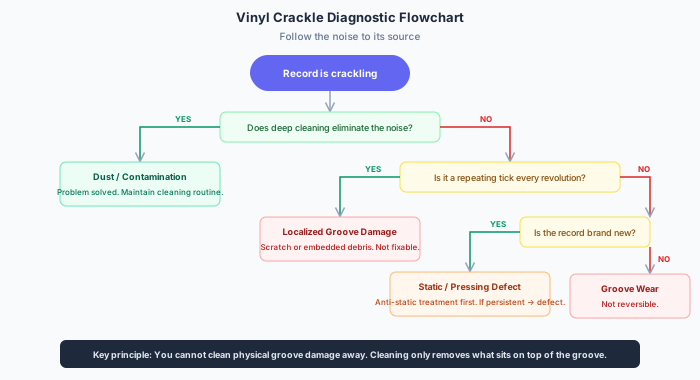
This is the question that frustrates collectors most. You have cleaned the record — perhaps multiple times, perhaps with an expensive machine — and it still crackles. Why?
Work through the hierarchy:
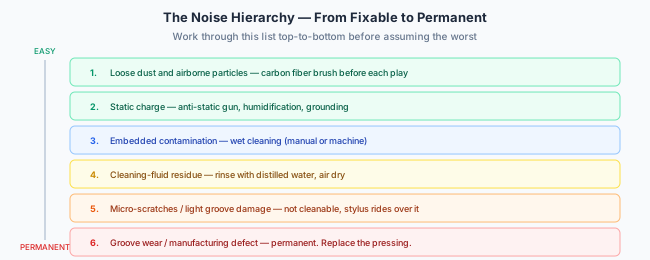
- Did you address static? Cleaning a record and immediately placing it on a static-prone platter reintroduces noise instantly. Clean, de-static, then play.
- Did the cleaning fluid leave residue? Rinse with distilled water. Some fluids are worse than the problem they claim to solve.
- Is your stylus clean? A contaminated stylus deposits material back into the groove. Inspect under magnification.
- Is your stylus worn? A worn stylus mistracts and generates noise that a healthy stylus does not. Styli have finite lifespans.
- Is your alignment correct? Misaligned cartridges create distortion that mimics surface noise — particularly on inner grooves.
- Is the groove physically damaged? If you have exhausted every cleaning and setup variable and the noise persists — the damage is in the vinyl itself. No amount of cleaning will fix it.
The critical principle: You cannot clean physical groove damage away. Cleaning removes what sits on top of the groove. It cannot restore groove walls that have been physically altered by scratches, wear, or manufacturing defects.
New Records That Crackle
A particular frustration. You buy a sealed, brand-new record — perhaps from a premium audiophile label — and it crackles out of the sleeve.
Common causes:
- Static from the shrinkwrap and inner sleeve — Removing shrinkwrap generates enormous static charge. De-static before first play.
- Mold release compound — A lubricant used during pressing that remains on the record surface. A single wet wash typically eliminates it.
- Pressing debris — Microscopic particles from the stamper or vinyl compound embedded in the groove. Wet cleaning resolves most cases.
- Actual pressing defect — Quality control varies between plants. If noise persists after thorough cleaning of a new record, the pressing is defective. Return or exchange it.
Rule of thumb: Always wet-clean a new record before its first play. Factory-fresh does not mean groove-clean. This single step prevents the majority of new-record crackle complaints.
When the Problem Is Not the Record
Before blaming the vinyl, verify that the noise is not originating elsewhere in the playback chain:
- Dirty stylus — Accumulated debris on the stylus tip generates noise that sounds like surface contamination. Clean it.
- Worn stylus — A stylus past its lifespan mistracts and creates noise. Replace it.
- Misalignment — Incorrect azimuth, VTA, or overhang creates tracking distortion that resembles surface noise
- Excessive tracking force — Too much force can generate distortion on loud passages. Too little force causes mistracking.
- Grounding issue — A hum or buzz that is not surface noise but is often confused with it. Check ground connections.
- Phono stage noise — Some phono preamps have audible noise floors. Swap the component to test.
The Realistic Expectation
Vinyl is an analog format with physical contact between a stylus and a groove. Zero surface noise is neither realistic nor achievable. Even the finest pressing played on the finest system will exhibit some level of background noise compared to digital silence.
The objective is not eliminating noise entirely. It is reducing noise to a level where it does not intrude upon the musical experience.
On a well-maintained system playing a clean, well-pressed record:
- Surface noise should be inaudible during music
- Quiet passages should be free of intrusive clicks
- The noise floor should sit well below the signal level
- Pops should be rare and isolated rather than constant
If your experience differs meaningfully from this — something in the chain needs attention. This article has given you the diagnostic framework to find it.
Conclusion
Vinyl crackle is not one problem with one solution. It is a symptom with multiple possible causes, each requiring a different response. The character of the noise — its pattern, intensity, consistency, and response to cleaning — tells you what is wrong.
Most crackle is fixable: dust, static, and contamination account for the vast majority of surface noise complaints and respond to straightforward maintenance.
Some crackle is not fixable: groove damage, wear, and pressing defects are permanent physical conditions that no amount of cleaning will resolve.
Learn to distinguish between the two. Your collection — and your patience — will benefit enormously.
Keep Reading
Diagnosing Vinyl Problems — A Complete Guide
A hub linking every article on vinyl playback issues: sibilance, inner-groove distortion, turntable setup, cartridge loading, and pressing quality.
Why Does Vinyl Sound Worse Near the End of a Side?
Inner-groove distortion is not one phenomenon. Learn how to separate inherent format limitations from correctable setup problems — and when the record itself is to blame.
Why Does My Record Sound Sibilant?
Sibilance is not one defect with one solution. Learn how to determine whether harsh 'S' sounds originate in the recording, lacquer cut, damaged groove, cartridge alignment, stylus, or phono stage.
Turntable Setup — Precision Matters
Azimuth, VTA, VTF, SRA, anti-skate, and alignment geometry — a guide to the painstaking process of dialing in your turntable for optimal playback.